Sunday, 13 May 2012

Install a network printer in Windows 7

Go to Start -> Control Panel

In the Category under Hardware and Sound select View devices and printers:


and in the next window click on Add a printer and Add a network, wireless or Bluetooth printer. Windows will start searching for available printer. When you'll see the name of the printer you want to connect to select it. Windows should automatically look for drivers for that printer.

Thursday, 10 May 2012

Erratic movements of mouse cursor?

It so happens that when typing fast the palm of your hand touches the touch pad of your laptop and the cursor moves, this causing you to type in an undesired location. There is a tool for Windows that can temporarily freeze the touch pad while you write text. It's called touchfreeze and you can download it from here:

http://code.google.com/p/touchfreeze/

Wednesday, 9 May 2012

ERROR 2003 (HY000): Can't connect to MySQL server on 'ip_address' (110)

If you came across this error, because it is in the 2000's error codes then it is a MySQL client error, this means that the connection that you are trying to establish doesn't reach the server, it stops somewhere before that.

If you are trying to connect to a remote MySQL server one common cause it's the firewall on the MySQL server host machine.

You'll have to set some exceptions for your firewall. So if you have Windows 7 do the following:

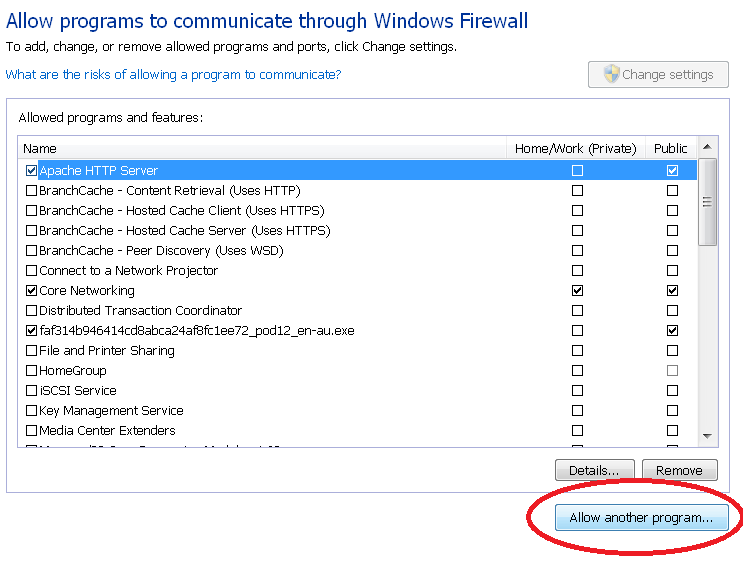
Control Panel -> Windows Firewall -> Allow a program of Feature through Windows Firewall


Once in the "Allow programs to communicate through Windows Firewall" click the button "Allow another program.."


and if it's not in the list that appears after clicking the button browse to the location where the executable is placed. In my case is:

"C:\Program Files\MySQL\MySQL Server 5.1\bin\mysqld.exe"

After you find the executable select it, click Open and in the next window click Add.

This will take you back to the  "Allow programs to communicate through Windows Firewall" window. Click OK.


XAMPP new security concept

"access to the requested directory is only available from the local network"
To fix this issue quick and dirty:
Comment the last LocationMatch node in  C:\XAMPP\apache\conf\extra\httpd-xampp.conf


Example:


#Close XAMPP sites here
#<LocationMatch "^/(?i:(?:xampp|license|phpmyadmin))">
#        Order deny,allow
#        Deny from all
#        Allow from ::1 127.0.0.0/8
#        ErrorDocument 403 /error/HTTP_XAMPP_FORBIDDEN.html.var
#</LocationMatch>


or set your own restrictions.

Sunday, 6 May 2012

Yahoo messenger not working on Windows 7?

Yahoo messenger throws Library exceptions?

Make sure you get the right version for your system.. You can download one from here:

http://www.windows7download.com/win7-yahoo-messenger/oycgtfpl.html


Apache restrict access to selected directories based on IP address

Apache let's you restrict access to selected directories using the mod_authz_host module.
To restrict access one option is to modify the httpd.conf file (in your Apache root folder). By default, your Apache configuration allows access to anyone. My original httpd.conf file has a section like the following:


<Directory "C:/xampp/htdocs">
    #
    # Possible values for the Options directive are "None", "All",
    # or any combination of:
    #   Indexes Includes FollowSymLinks SymLinksifOwnerMatch ExecCGI MultiViews
    #
    # Note that "MultiViews" must be named *explicitly* --- "Options All"
    # doesn't give it to you.
    #
    # The Options directive is both complicated and important.  Please see
    # http://httpd.apache.org/docs/2.2/mod/core.html#options
    # for more information.
    #
    Options Indexes FollowSymLinks Includes ExecCGI


    #
    # AllowOverride controls what directives may be placed in .htaccess files.
    # It can be "All", "None", or any combination of the keywords:
    #   Options FileInfo AuthConfig Limit
    #
    AllowOverride All


    #
    # Controls who can get stuff from this server.
    #
    Order allow,deny
    Allow from all


</Directory>


Note that an .htaccess file placed in a selected directory will override the access set in the httpd.conf file.


C:/xampp/htdocs is my Apache root folder so if I want to restrict access to only localhost, the restriction would be:


<Directory "C:/xampp/htdocs">
    
    Order deny,allow
    Allow from 127.0.0.1


</Directory>


after making changes, restart Apache. You first deny access to all (which is the default behaviour) and then allow access to localhost.


Can't restart Apache from XAMPP?

Use the command line and run cmd as Administrator:


C:\>net stop Apache2.2

respectively,

C:\>net start Apache2.2